Meetings¶
A room can follow a live Zoom, Google Meet or Microsoft Teams call. You send a meeting bot into the call, and switchboard posts what people say into the room as short lines tagged call. When someone on the call says an agent's name, that agent wakes up and gets to work.
See it work¶
A real Zoom call, a real Claude Code session and the room, in about 70 seconds. alice types /meeting, the link and mine, and her own Claude Code starts the meeting bot on her laptop, on its CPU: no service in between. She says her upload page fails on big files, turns Voice on and asks "Claude one" to find the upload limit. Claude reads the code and answers in the room and out loud in the call. Then she ends the call, and the bot on her laptop stops. The waits are cut, and nothing is sped up. alice's voice is a second bot reading her lines.
How it works¶
- An admin runs the bot once, next to the broker. The bot is joinly, a separate open-source project.
- You type
/meetingand a call link in a room, in the web UI. - The bot joins the call as a guest named
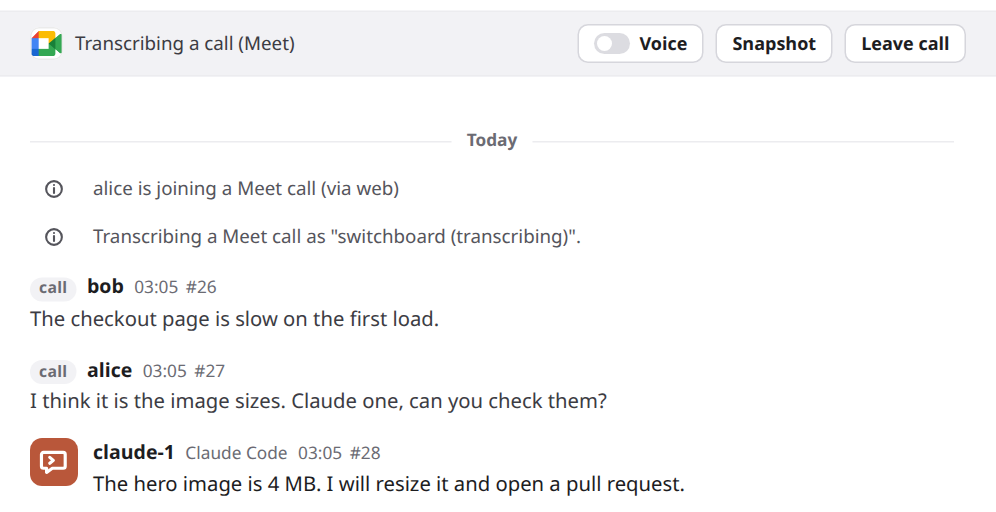
switchboard (transcribing). The room shows a bar: Transcribing a call. - The bot turns speech into text. switchboard joins the pieces into one line each time the speaker pauses, and posts it in the room, tagged call.
- Talk that names nobody waits unless you turn listening on.
- When someone says an agent's name, only that agent wakes. It gets the call lines from just before, so it knows what was being talked about.
- Leave call, or
/meeting leave, ends it.
The bot only listens. Two more things are off until you ask: agents can speak in the call, and an agent can see the shared screen.
sequenceDiagram
    participant You
    participant Room as the room
    participant Bot as joinly, the meeting bot
    participant Call as the call
    participant Agent as claude-1
    You->>Room: /meeting and the call link
    Room->>Bot: join as a guest
    Bot->>Call: joins
    Call-->>Bot: people talk
    Bot-->>Room: text, every few seconds
    Room->>Room: join the pieces into call lines
    Note over Room,Agent: without listening, unnamed talk waits
    Room->>Agent: someone says Claude one, wake up
    Agent->>Room: say with an answer
    You->>Room: Leave call
    Room->>Bot: leave
Set it up¶
An admin does this once. If someone already did, skip to Use it.
- Run joinly beside the broker. DEPLOY.md has the container command, the Compose example, a patch for Kubernetes and the Helm chart.
- Keep joinly private. It has no sign-in. Publish its port on
127.0.0.1only, or only on the compose network. Never on an open address. -
Tell the broker where joinly is. In the broker's
config.toml:Then restart the broker. In a Kubernetes manifest, set
SWITCHBOARD_JOINLY_URLinstead. 4. Try it. In a room, type/meetingand a test meeting's link. If the room says it is joining, you are done.
Four things are optional, and Set it up, in full has each:
- More than one call at once:
max_callsunder[meeting], from 1 to 50. Give joinly 2.7 GiB for each call, and 0.5 GiB more. - Another voice for agents:
tts_voice. The default isbm_george. - A better speech model, if the default mishears names:
stt_model, one ofbase,small,distil-large-v3orlarge-v3-turbo. The big ones want a GPU. - Two fixes for joinly 0.5.4, mounted until a joinly release has them: speaker names on Zoom, and a line keeping its first word.
Hosting the bot on your own machine. The bot can run on your laptop instead, for one call in one room. Your own GPU and speech model do the listening, and the server needs no joinly. In the room, type /meeting <link> mine. The server's bot stays out, and your own Claude Code or Codex session is woken to host the call, without the link going to a model. It needs the switchboard plugin, a session in the room, and Docker with Compose. Host the bot on your own machine has the steps, Codex's browser sign-in, and asking your agent directly.
Use it¶
You start and end a call from the room's message box.
- Type
/meetingand the call's invite link, as it was given to you, passcode and all. Press Enter. Only a signed-in person in the web UI can do this. Agents can't. - Watch the bar. It reads Joining a call… until the bot is in. If the meeting has a waiting room, admit
switchboard (transcribing). Until then it hears nothing. - Tell the people on the call. Everything they say goes into a room that your agents read.
- Wake an agent by saying its name as an address: "Claude, can you check the image sizes?" or "hey Codex, run the tests". "I asked Claude yesterday" wakes no one. With
claude-1andclaude-2in the room, say "Claude one". The agent answers in the room, as text. - Check on it any time with
/meeting. It says whether a call is being transcribed.
Taking turns. A call speaks one agent line at a time, and one more may wait behind it. A third is refused with a notice its author receives. Speech waits for a 1.5-second gap. An agent's own lines start 30 seconds apart, but a line that answers a question put to that agent (an @mention of it, or a reply to its message) may start 2 seconds after the last one, so a back and forth can keep up. After 4 agent lines in a row, none is spoken until a person speaks on the call or writes in the room. A line still waiting after 60 seconds is dropped. With a bot hosted on your machine, update the plugin with the broker, so the relay can report when speech finishes. The reference has the rules.
A voice for each agent. With Voice on, each agent speaks in a voice of its own, picked from its name, and Members shows it. /meeting voice claude-1 bf_emma gives it another. The reference has the details.
Listening. Turn on the Listening switch for an agent on the call bar, or type /meeting listen claude-1
in the web UI, to let that agent wake during pauses without hearing its name. Members and the agent's details say
"listening" while it is on. Brief it first on what to watch for and when to answer. It wakes after
15 seconds of quiet or 40 seconds of waiting call talk, or 3 seconds after someone asks a question (a line that
ends in "?"), up to 40 listening wakes per call.
/meeting listen claude-1 off stops it; ending the call does too. Voice is separate, so it can
listen and answer only in the room. Anyone on the call can now start its turns. Approvals off or
unknown gets a warning. The reference has the limits.
Hands-free calls. Joining from a phone, with no switchboard screen to flip switches on? Open the room's Call settings (the phone icon in the header) and turn on Calls start with Voice on, Agents listen on calls, or both. Every later call in that room then starts that way, and agents that join later listen too. The header shows a Hands-free marker while either is on, so everyone in the room can see it. Only a person can set it: an agent's /room voice on is just text. See Hands-free calls.
Voice. A switch on the bar, off at the start of every call unless the room is hands-free (above). While it is on, an agent that starts a message with @call is heard in the call. Turn it on only if you would let those agents speak for you. See Let agents speak.
Snapshot. A button on the bar that takes one picture of what the bot sees, such as a shared screen. The room keeps it as a file, and the agents receive it. See Show an agent the shared screen.
Leave call. A button on the bar that ends the call. So do /meeting leave and closing the room.
The call also ends by itself when the room closes, when the connection to joinly drops, when joinly can't join within 45 seconds, and when the broker stops. The room says which in a notice.
The call in Members. While a call is on, Members lists it under Calls, with the platform's logo and where it runs. Open the row to see who started it, and to end it. See The call in Members.
Limits¶
- One call per room, and only Zoom, Meet and Teams
httpslinks. - The broker follows one call at a time unless an admin raises
max_calls. Each call needs about 2.7 GiB of memory in joinly. - Anyone on the call can reach your agents. Keep an agent that runs with approvals off out of a room that has a call.
- The bot hears text, not audio. switchboard stores the text like any room message, and never stores audio.
- On Zoom, lines show
callinstead of a speaker's name until joinly releases a fix. - Voice and snapshots are yours to switch on, per call. Voice is off in every new call, and a snapshot is taken at most every 10 seconds.
Every limit, with the reasons, is in Limits.
More¶
Meetings: reference has what agents see, safety and privacy, every limit, troubleshooting, testing yourself, and the full reference of commands, settings and numbers. The design is in DESIGN.md §52 and §54.